Browser Authentication Demo
Learn HTTP Basic Authentication and how to handle it in Playwright
Playwright + AI Test Automation Masterclass with TypeScript
What is Browser Authentication?
Browser Authentication (HTTP Basic Authentication) is a simple authentication scheme built into the HTTP protocol. When you access a protected resource, the browser displays a built-in login dialog asking for username and password.
- Browser displays a native authentication dialog (not an HTML form)
- Credentials are sent with every request in the Authorization header
- Credentials ride in the Authorization header instead of a form submission
- Commonly used for APIs, staging environments, and simple protection
Demo Credentials
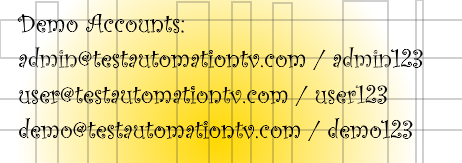
Use any of these application accounts to test browser authentication. They are the same users available on the standard login form.
Practice Playground
Test credentials directly from this page without triggering the browser dialog. Each attempt counts toward the 6 requests per minute rate limit, just like a real request.
Testing with Playwright
Method 1: Embed Credentials in the URL (Simple)
This is the simplest method, where you prepend the account identifier and password to the domain in the URL.
- Construct a URL in the format:
http://<username>:<password>@your-domain.com. For email addresses, remember to percent-encode the@symbol (e.g.,admin%40example.com). - Use this full URL in your
page.goto()command.
// Embed credentials in URL
await page.goto('https://username:password@example.com/protected');

// For this demo:
await page.goto('http://admin%40testautomationtv.com:admin123@localhost:5000/browser-auth-protected');
Method 2: Set the `Authorization` Header (Flexible)
This method involves manually creating and setting the Authorization header for the page context.
- Combine the username and password with a colon:
username:password. - Base64-encode this combined string.
- Use
page.setExtraHTTPHeaders()to set the header for all subsequent requests on that page. - Call
page.goto()with the normal URL (without credentials).
// Set authentication header before navigation
// In Node.js, use Buffer for Base64 encoding.
const credentials = Buffer.from('admin@testautomationtv.com:admin123').toString('base64');
await page.setExtraHTTPHeaders({
    'Authorization': `Basic ${credentials}`
});
await page.goto('http://localhost:5000/browser-auth-protected');
Method 3: Use Browser Context Credentials (Recommended)
This is the cleanest and most secure approach. You configure the credentials at the browser context level, and Playwright handles the authentication automatically.
- When creating a new browser context, pass the
httpCredentialsoption with the username and password. - Create a new page within this pre-configured context.
- Navigate to the page as you normally would; Playwright handles the rest.
// Create context with HTTP credentials
import { test, expect } from '@playwright/test';

test('basic auth demo', async ({ browser }) => {
  // Create a new context with credentials
  const context = await browser.newContext({
    httpCredentials: {
      username: 'admin@testautomationtv.com',
      password: 'admin123'
    }
  });

  // Open a new page with that context
  const page = await context.newPage();
  await page.goto('http://localhost:5000/browser-auth-protected');

  // Verify access was successful
  await expect(page.getByRole('heading', { name: /Authentication Successful/i })).toBeVisible();

});
Best Practices
DO:
- Store credentials in environment variables
- Use HTTPS in production to protect credentials
- Set credentials at the browser context level
- Handle authentication failures gracefully
- Test both successful and failed authentication
DON'T:
- Hardcode credentials in test scripts
- Commit credentials to version control
- Use HTTP Basic Auth for sensitive production apps
- Try to interact with the browser's auth dialog
- Forget to test 401 unauthorized responses